Android 4.2 is still Jellybean

I go over some of the new features in the latest version of Android, 4.2. Unfortunately you'll have to wait for Key Lime Pie, this one is still Jellybean.

Halo 4

The latest Halo is out. Check out some pics from the midnight release.

My Favorite Android Launchers

What is a launcher and why do I want to change it? There are many launchers to choose from. Here is a list of my Favorites.

iPad mini

Load your new iPad mini with the best games that will be great with the smaller size.

Showing posts with label Android. Show all posts

Friday, November 9, 2012

Android 4.2 is not Key Lime Pie, sticks with the Jellybean name

I'm sorry to say that the latest version of Android is not Key Lime Pie. Version 4.2 is staying with the Jellybean name, most likely because it is a smaller update that adds only a few new features. Speaking of features. Let's take a look at the upcoming features that you can expect in the new version.

Multiple user accounts
In this new version, users can make multiple log in accounts for children, a spouse, or anyone else they would like. Each user can customize their home screens, apps, and email addresses. Changing accounts is easy, it is done from the lock screen very similar to a Windows log in screen. This will allow parents to control what apps the child has access to and keeps contacts, emails and other important information away from them. As a parent this is a huge feature. My son has bought apps on more than one occasion, but those issues are a thing of the past.

Google Now updated
Google Now is a virtual assistant that can give you reminders of appointments, weather conditions, traffic, and many other things. It is by far a much better solution than Apple's Siri virtual assistant. However, it isn't perfect. It's getting closer with the new updates in the form of more cards. Now you will receive flight reminders, dinner reservations, local events, movie times and locations, and you can track your shipments all in one place. I personally loved Google Now before the update (it is my favorite thing about Android by far) and now it's just gotten even sweeter.

New camera app
The camera app has been stripped of all the confusing menus opting for another confusing, ring style menu. Just hold the viewfinder to bring up a circle of options and drag your finger over an option to select it. That's not the only thing that has changed, though. A new feature called PhotoSphere has been added. It's like a panoramic photo on steroids. It allows you to take a full 360 degree photo of your surroundings as well as taking vertical panoramic shots. It's a pretty cool feature, but I personally have had access to panoramic photos and I almost never use them.

New keyboard with gesture typing
It seems like Google is never happy with the stock keyboard because every minor update seems to modify it in some way. This is a major update to the keyboard as it adds gesture typing natively. My favorite alternative keyboard is Swype. I use it all the time and I find it much faster and more accurate than the stock keyboard. However, Swype seems to crash...A LOT. It's nice to have the same style of typing integrated into the stock keyboard experience. One improvement over Swype and other gesture based keyboards is that a word bubble pops up showing you what word the keyboard is predicting that you want to type. Neat, but you'll be too busy typing quickly to really make good use of it.

New screen saver
This feature is called Daydream and is totally pointless on a phone, almost pointless on a tablet. Daydream is an old school style, desktop screen saver for your device. It will cycle through random pictures in your camera roll. I have an iPad which has a similar feature but I barely ever use it. Now imagine putting that on a small 4.5" display that is meant to be in your pocket when you aren't using it. Sound very useful? I don't think so.

Miracast, aka Airplay for Android
I don't care what people say, copying Apple is almost always a good thing. Google's latest Xerox is called Miracast. It operates almost the exact same way as Airplay for iOS. It will mirror what is on your display wirelessly to your HDTV, assuming your HDTV is compatible. This makes gaming and sharing photos and videos much more enjoyable on your phone or tablet.

So those are most of the features you can expect in the next release of Android. No news on when it will be released for specific devices but you can expect to wait about a year or so. It is heading to the Nexus 10 and 7 tablets, as well as the Nexus 4 on November 13, 2012. Current Nexus 7 owners should expect the update around the same time. No news yet on Galaxy Nexus or any other Nexus phones receiving the update just yet. As soon as I hear about specific device updates I will let you know.

Wednesday, November 7, 2012

My favorite Android launchers

When I used to work in retail selling phones about half of my customers had no idea what Android was and the other half thought they knew what Android was. I would ask them basic questions like, "Why do you like Android?" and they would say something like, "Because it's customizable." Then I would take a look at their old Android phone and it would be completely stock with widgets thrown all over the place with a terrible background of their dog or significant other. That is what customizing meant to them. But the true test to see if anyone knows anything about Android is to ask them what their favorite launcher is. I would bet that if anyone here asked a friend or family member who owns and Android phone what a launcher is for Android that they would have no idea what you are talking about.

So what is a launcher and why is it important?
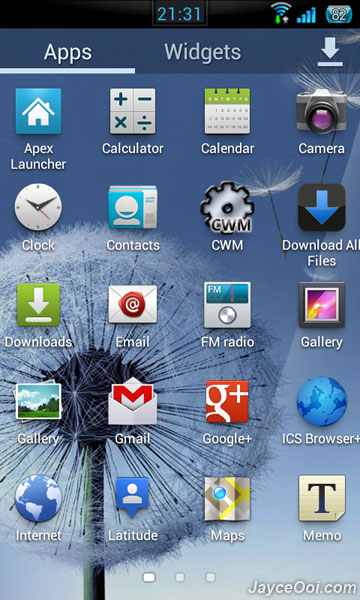
Let's answer the first question. What is an Android launcher? A launcher is simply the main home screen and app drawer for your phone. It will display all of your apps, widgets, wallpapers, etc. so you can interact with it. Android is set up in a way that if you don't like how the stock launcher looks, is organized, whatever, you can download an alternative launcher to the native one. For example, the Galaxy S3 uses Samsung's Touchwiz launcher. If you were to look in the manage apps list you would find TWLauncher, that's the stock launcher. This is what it looks like:

homescreens
app drawer
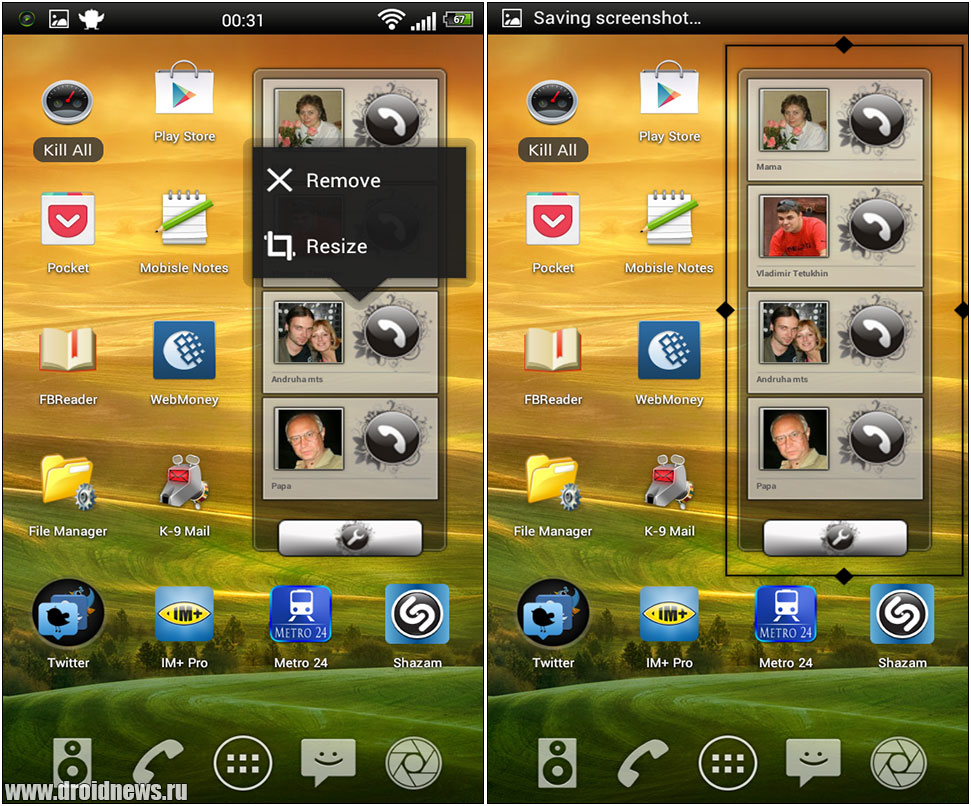
All of the icons and widgets are completely stock and haven't been changed. However, you can really customize the way your phone looks and operates by changing your launcher. Here are some examples:


You can change quite a bit with new launchers. This is what customizing Android is and it can be very beneficial. So why would you want to change your launcher?

One of my favorite reasons is performance. Using a different launcher generally increases the speed of your device. The reason is that most stock launchers use much more memory than ones you can download from the Play Store. By decreasing the amount of memory needed to run the launcher, your other apps and games can use the extra memory. Another reason why you would want to do this is to adjust the way your phone behaves. Additional gestures and customized docks and notification bars can really help you do more things faster than with a stock launcher.

There are some things you need to watch out for when downloading a new launcher. Make sure the launcher is compatible with your version of Android. Some launchers require that your phone be rooted for features to work. Make sure you read the description of each launcher to find out if it requires root access. Also, you will want to download icon packs for certain launchers to customize the look even further. Don't be afraid of messing up your phone. You can always restore your original, stock launcher through the "Manage Apps" settings panel.

Experiment with a new launcher and see what works for you. My personal favorites are Nova Launcher, Go Launcher EX, Launcher 7, and Apex Launcher. Just know that any stock widgets will most likely be disabled in the new launcher so you might have to find replacements in the Play Store. Check out all these great launchers in the Play Store and don't forget to check out my How To videos for more tips and tricks.


Monday, November 5, 2012

*Update* Evernote - PC/Mac/iOS/Android/WP7

Ok, so I finally finished the video and got it uploaded. This week we are taking a look at Evernote, a note taking app that syncs all of your text, picture, and voice notes across all of you devices. It's a completely free service and can help with remembering basic things, collaborating on projects, or planning events. Check out Evernote's website to sign up for your account to get things started.


I'm working on this week's video tutorial for you guys. It will be up in about an hour or so. Thanks for your patience and check back in bit!

*Update*
I'm using a new video program and it is taking a lot longer than I thought it would. I will have it up as soon as I can.

Saturday, November 3, 2012

Movies on the cheap! - Redbox

Redbox at a local Walmart
Going to the movies is expensive and taking a date just doubles the cost. A new release movie can cost upwards of $20 for a pair of tickets, and then add on the concessions which cost about four times as much at the theater than the grocery store. You can easily spend $40 for a few hours of entertainment! That's ludicrous! For $40 the movie better be good. If you are like me and have very little money to spend on entertainment then I have good news for you.

If you have ever seen the red kiosk pictured above in a store but never bothered to figure out what is was for, you are missing out. That is a Redbox kiosk which allows you to rent DVDs and BluRays for cheap. For as little as $1.20 you can take home a very recent movie for one night and since you are at the store you may as well grab some popcorn and drinks. For the same night of entertainment you can spend less than $5. Sometimes you can save even more with promo codes inside boxes of popcorn for free Redbox rentals.

Christmas is coming up and that usually means spending a lot of money on gifts. By using services like Redbox you can keep yourself entertained and still have plenty of money left for your gifts. Download the Redbox app or head over to Redbox's website to see what's available and have a date night tonight!

Monday, October 22, 2012

Tips For Creating Better Passwords

More and more websites are requiring more complex passwords to create an account. Your cat's name is no longer a good option (it wasn't a good one in the first place) for a password to create an account. Google requires a password that is at least 8 characters long with at least 1 number and 1 upper case letter. For example "newyorkjets15" is not a good password, but "NewYorkJets15" is a good password.

The reason websites are requesting more complex passwords is that it is much harder to use "brute force" to get into an account. "Brute force" is simply a term of using a program to try every possible password containing a certain amount of characters. The simpler the password, the less time it takes for the program or "bot" to figure it out. If you add a capital letter to an existing password it effectively doubles the difficulty at guessing the password.

So how can you create a more complex password and still remember what it is? Well, one trick I use is to mover the position of one of your hands to the left or right by one letter. So "Pickles123" becomes "Oucjkes123". I moved my right hand over one letter to the left, so P becomes O, I becomes U, K becomes J, and L becomes K. This allows your mind to remember your old password of "Pickles123" but makes it unique and complex. Another trick is to use what is called a passphrase. A passphrase is just what it sounds like, a phrase you will remember like without any spaces. For example, "Ilovemywife09" is a simple to remember password but it is long enough to be complex. The "09" being the year you were married adding a little more complexity to the passphrase. Make the numbers something you can remember but try not to use things that can easily be researched online or in a library, such as a birthdate or part of your SSN.

There is more and more identity theft occurring and you should take your online presence very seriously. My friends just recently had their identities stolen on their tax returns and up until this past week they still hadn't filed their taxes. Protecting yourself can be simple and I hope that this post has helped you realize that creating passwords are easy.

3 Reasons to Sign Up For a Google Account

If you have an Android device you have probably noticed that your phone asks you to sign up for a Google account. If you haven't already I'm going to give you 3 reasons to get one. I'll also tell you how to get the most from your Android device and Google account.

1. Automatic backup of contacts
With your new Google account on your Android device, you can backup your contacts automatically to Google's secure servers. This is especially helpful if you upgrade your device in the future or if you happen to misplace it. It takes just seconds to sync all of your contacts to your new device. Even if you don't get a new Android device and go for say a Windows Phone device, you can still sync all your contacts. You can also sign into your Gmail account from a computer to manage your contacts more easily.


2. Download those apps!
Without a Google account you will not be able to access the Google Play store. Creating an account allows you to download your favorite apps and games like Where's My Water and Pandora Internet Radio. Best of all your Google account will keep track of any apps you purchase so if you move to a new Android device you can re-download any apps you purchased from your old device for free.


3. Google Drive
Google drive is the best way to keep all of your files on all of your device all of the time. With 5GB of free storage you can keep your important files easily accessible from your phone, tablet, and computer. It keeps everything stored on Google's servers so it doesn't take up space on your phone. That means if you want to download the latest game to your device but your are out of room, you can keep your files in your Google Drive to free up space.
To sign up for a Google account is free and there are many more things you can do with it, but these are the best features for Android phones and tablets. So pull up your settings and navigate to the Accounts section and add a Gmail account to get started.

Saturday, October 20, 2012

Jellybean!

When I say jellybean do you think of candy or cell phones? I'm talking about the latest version of the mobile OS Android. The latest version is 4.1 codenamed "Jellybean". My problem with this latest version is that it was released when only about 10% of all Android devices were running the previous version, 4.0. In fact, even now the most common version is two years old, version 2.3 or Gingerbread. This is ridiculous! Apple releases a new version of iOS every year and with the latest version 6.0, more than 50% of all devices have it. Even with Windows Phone the updates are all rolled out within about 60 days. I hate Android because you can buy a brand new phone with a 2 year old OS. Talk about a waste of money. Let me know what you think. Do you like Android? Are you still running version 2.3? Did you even know that 2.3 is over 2 years old?

5 Reasons to Buy A Smartphone and 5 Reasons to Keep Your Dumbphone

5 Reasons to Buy a Smartphone

1. Save time and money
With the ability to stay connected to the internet wherever you go you have tremendous money and time saving tools in your hand. If you need to get gas, you can use your phone to find the cheapest gas nearest you. Forgot to clip coupons? There are plenty of websites and apps that you can use to digitally clip coupons and add them to your discount card. If you have lost your way to an event that is out of town and you need directions, a smartphone has GPS built right in so you can find your way again. You can even scan barcodes at stores to comparison shop on the fly!

2. Get rid of your devices!
Consolidate your devices into one smartphone and save yourself a lot of headaches keeping track of them all. Let's list all the devices a smartphone can replace: watch, calculator, calendar, organizer, GPS, mp3 player, digital camera, digital camcorder, TV, digital voice recorder, torpedo level, gaming device, compass, flashlight, oh and let's not forget our regular cell phone. I'm sure there is more, but I just listed off 15 devices that do the same thing a smartphone does.

3. The purchase price is about the same as a dumbphone
With many dumbphones running $50-$150, you can get mid-range to high-end smartphone for the same price and sometimes cheaper! Why not get a better phone if you can get it for a better price?

4. Trade up for a better phone
More and more retailers are taking trades for new phones. A smartphone is far more valuable than a dumbphone when trying to trade them in. If you take a dumbphone that cost $50 on contract and a smartphone that cost the same, you can get between $30-$100 more for your trade even though the purchase price was the same. Let your money work for you by trading in your old smartphone.

5. Get with the times!
Everyone has a smartphone! That is if you consider about 46% of cell phone owners everybody. But a smartphone can really increase your status socially and professionally. Carrying the right device can make you appear to have a higher status than you might actually have.

5 Reasons to Keep Your Dumbphone

1. Extra monthly charges
I'm not even going to go into the fact that some companies are eliminating unlimited internet usage because the fact is that most people do not approach their limits. Instead, I'm going to focus on the guaranteed cost added to your bill to own a smartphone. You can add anywhere from $20-$50 per phone or $50-$150 per family plan. That's every month! If you don't utilize the money saving features of a smartphone then it's probably not worth it.

2. More complicated
Smartphones generally have a large learning curve if you have never owned one before. The operation is going to be totally foreign if you haven't had one in the past. Gone are the physical buttons and tiny screens. The new smartphones of today have large, glass displays and hardly any physical buttons. With the displays being so big there is no room for anything else, which means that all those physical buttons are moved to the touch screen. That might be a little hard for you to get used to.

3. More expensive to maintain
In order to insure a smartphone, expect to pay about $2 more per month than your old dumbphone. On top of that, the deductible is more than twice that in some cases reaching up to $150-$200 to fix or replace a lost, stolen, or damaged phone!

4. Longevity
With all the extra functions and features these new smartphones have, the battery life is generally expected to last only a full day with moderate use. If you get better battery life than a full day that is considered exceptional battery life for a smartphone. Most dumbphones can last several days without needing to be charged.

5. Carrying around extra devices isn't a big deal
Maybe you are the type of person that doesn't mind carrying several devices around. I mean, who needs to carry a nice digital camera with them to the grocery store? Or a gps to work? Sometimes a smartphone is just too much even though you have fewer devices with you.

I love my smartphone and I would have a hard time living without it. I'm not saying it can't be done, but it sure would be difficult. I find value in my phone everyday that makes the extra monthly cost worthwhile. If you are contemplating upgrading to a smartphone then I believe that should be your measure for deciding on if you should get one or not. If you just recently upgraded from a dumbphone to a smartphone, let me know what you think of it! Do you find more value in the daily use of your smartphone or is it too expensive for what you use it for?